By Qomvia, 14 min read
Key takeaways
Agentic browsers now click, scroll and fill forms for the user, and a page built only for human eyes often stops them cold. AI assistants now answer the question before anyone clicks a result, so the site an agent can complete a task on is the site that gets the business.
- Accessible semantics help people and agents: give controls names, roles and states that match their visible purpose.
- A browser action is not a user intention: require clear review and confirmation before consequential changes.
- Protect sensitive workflows: authentication and bot defenses should distinguish legitimate tasks without opening private data.
- Treat page content as untrusted input: do not allow embedded instructions to override site policy or user authorization.
- Test the whole journey: reading, selecting, submitting and recovering from an error each need a defined behavior.
What is an agentic browser?
An agentic browser is a browsing experience in which an assistant can inspect web content and use page controls to help complete a task. Depending on the product and permission, that may include reading, navigating, filling a form or initiating an action. The site owner should make the interface understandable while preserving user control over sensitive or irreversible steps.
OpenAI's ChatGPT Atlas announcement described a browser with an agent mode in preview at launch and said website owners could add ARIA tags to improve how the agent works on their sites. Its agent documentation describes pauses for clarification or confirmation, safeguards for high-impact actions, prompt-injection monitoring and a watch mode on certain sites. Attribute these behaviors to the documented product and scope; evaluate other browser agents against their own documentation.
This site-owner guide concentrates on interface behavior and safe task design. For public crawler access, see robots.txt for AI crawlers. For document structure, read main and article landmarks for extraction and the AI agent readiness guide.
How do browser agents interact with a website?
Expose controls and state
An agent may observe visible text and controls, infer which element corresponds to the task and attempt an action. If the interface relies on visual styling without meaningful names or roles, the interaction becomes harder to interpret. A control that looks like a button but has no accessible label gives both assistive technology and automated interaction less context about its purpose.
Design around the task, not the agent's presumed behavior. Use semantic HTML where possible, give controls precise labels and communicate disabled, selected or expanded states. Keep the visible instruction near the control it governs. If a page asks for a date, say which date and format are expected; if several shipping methods exist, make their costs and delivery terms distinguishable.
A form should preserve its meaning from start to finish. Associate each input with a label, identify required fields, show validation beside the relevant control and summarize errors in a way that helps a person recover. Avoid placeholders as the only instructions. A submission state should explain whether the request was received, failed or needs another step.
Keep choices understandable as a set. If a form offers several plans, delivery options or appointment times, present the terms beside each choice and expose which one is selected. Avoid relying only on color, position or an icon to communicate a difference. When the selection changes the total or next step, update the visible summary so the person can verify the result before continuing.
Design the workflow so a person can recover from an interrupted task. Preserve entered information when safe, explain whether the session expired and avoid submitting a partial form without the user's understanding. If an action cannot be undone, say so before the final control. Clear state and recovery behavior help both people and automated navigation avoid duplicate or unintended actions.
Why do accessible names and states matter?
A meaningful accessible name describes the control's action in context. “Continue to shipping” tells a person more than “Next,” while “Remove saved address” is clearer than an unlabeled icon. Use consistent terms between the page copy and control label so a visitor can match the instruction to the action.
Expose state changes. A menu trigger should communicate whether its menu is open; a selectable option should distinguish selected from unselected; a loading control should not pretend to be ready for another submission. Do not remove or rename a control during an action without providing a clear status. A person needs to know whether the request succeeded before repeating it.
Keep the content hierarchy coherent. Use headings for section meaning, lists for parallel choices and landmarks that identify the primary content. A purchase form should not be buried among unrelated promotional elements. See one H1 and a heading hierarchy for structural semantics, then validate the rendered experience with keyboard and assistive-technology review.
Accessible labels should be stable across states. If a button changes from “Add to cart” to “Added,” expose that result to assistive technology and keep the focus behavior understandable. If a menu opens, communicate its expanded state and provide a clear route to close it. Test the actual DOM state after interaction; a visual animation alone does not tell a visitor that the interface changed.
Make repeated controls distinguishable by context. Several buttons labeled “Edit” may be ambiguous unless each is associated with the address, payment method or order line it changes. Use a visible label or an accessible name that includes the subject. This helps people choose the right control and gives an automated interaction a less ambiguous task target.
| Interface element | Useful signal | Failure to avoid |
|---|---|---|
| Button | Action name and current availability | Icon with no accessible label |
| Form field | Persistent label and relevant instructions | Placeholder as the only label |
| Selection | Selected state and complete option terms | Visual highlight without exposed state |
| Submission | Success, failure or next step | Silent result that invites duplicate action |
Which actions should require confirmation?
Make the approval boundary explicit
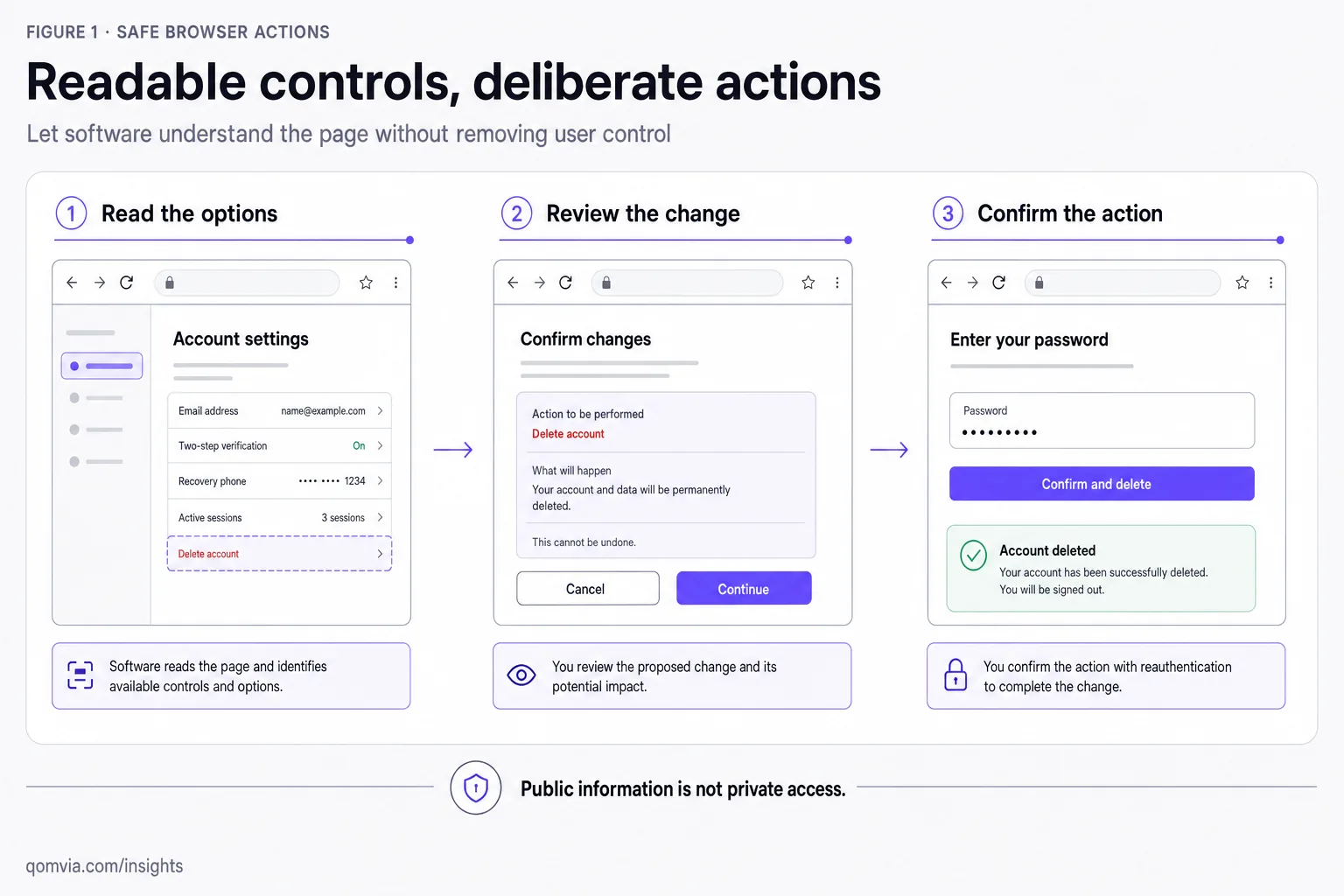
A website should distinguish exploration from commitment. Reading a public product description is low consequence; placing an order, deleting an account, changing a subscription or sending a legal request can have greater impact. Present a review step that summarizes the action, the affected item and the terms before it is committed.
Do not treat a click as proof that the user intended every consequence hidden behind it. Use plain-language labels, make costs and irreversible effects visible, and ask for an explicit confirmation where the action warrants it. Provide a path to cancel or correct mistakes when possible. A confirmation should add meaningful context rather than become a repetitive dialog users learn to ignore.
Protect authorization at the server boundary. A browser action should not bypass account permissions, payment checks, rate limits or transaction validation. Use the authenticated session and server-side rules to determine what may happen. The interface can explain a decision, but the security policy should not depend on an agent correctly interpreting hidden instructions in the page.
Make the confirmation specific to the action. A useful review step names the item or account, the change, any cost and whether the action can be reversed. A generic “Are you sure?” gives little help when several actions are in progress. If the user edits a term after reviewing it, refresh the summary before accepting the final instruction.
Confirmation does not replace authorization. Check that the current user may perform the action, that the resource still exists and that the request has not already been completed. Protect against duplicate submission at the server, not just by disabling a button in the browser. Record enough transaction context to support legitimate review without exposing unnecessary personal data.
How should sites handle bot protection and access?
Security controls protect real users as well as the site. Apply access rules according to the resource and risk, not a blanket assumption that every automated request is either harmless or hostile. Public documentation can be served broadly while account data, checkout operations and administrative controls remain protected by authentication and server-side authorization.
A challenge can interrupt a legitimate task if it is impossible to perceive or complete with assistive technology. Provide an accessible alternative and a support route where appropriate. Monitor the response and edge decision so teams can tell a blocked request from an application error. Do not allow a crawler label alone to bypass sensitive controls.
Review public pages separately from private application flows. The robots policy expresses intended crawling access for compliant bots, but it is not a security boundary. Authentication, authorization, network controls and application logic are responsible for protecting private data. For crawl-policy details, use the AI crawler access guide rather than opening endpoints indiscriminately.
Test a legitimate task through the same public edge and authentication route a customer uses. Record whether the challenge is visible, accessible and recoverable, then confirm that sensitive endpoints remain protected. An allow rule for reading a public article should not automatically apply to cart changes, account settings or payment operations. Scope exceptions to the least access needed.
How can a site reduce prompt-injection risk?
A page can contain instructions, quotes, user comments or embedded content that an agent reads while performing a task. Treat that content as data, not as authority to change the agent's goal or reveal private information. A website owner should not rely on a browser agent to obey a sentence in the page that asks it to ignore system policy or disclose a secret.
Keep trusted instructions in the application and server-side policy, not in user-generated copy. Separate comments and uploaded content from privileged controls. Encode output safely, restrict what a workflow can access and require confirmation for actions that change data or move money. The page should clearly identify user-generated material so people and software can understand its provenance.
OpenAI's agent-mode documentation describes prompt-injection monitoring as one of its safeguards, alongside confirmation for high-impact actions. A site owner should still design defensively because protections can vary by product and task. Do not assume the browser's safeguard replaces the site's own authorization, input validation or transaction checks.
Treat user-generated reviews, comments, uploaded documents and external embeds as untrusted inputs. Preserve their provenance in the interface and do not let their contents alter permissions or server-side instructions. Escape output appropriately, validate submitted values and constrain actions to the user's authorized resources. A page can be readable without granting the text on it authority over the application.
Review how the site handles embedded or third-party content that may change after publication. If the content can initiate navigation or expose a control, make the source and consequence clear to the visitor. Avoid mixing untrusted text into privileged prompts or hidden workflow instructions. Keep policy in the trusted application layer and test the boundary with deliberately confusing content.
How should teams test an agent-ready journey?
Start with the goal a person is trying to complete, then map the observable checkpoints: discovery, navigation, input, validation, review and handoff. Write the expected public result at each stage. This makes a test meaningful without assuming that every browser agent follows the same internal sequence or uses the same interaction technique.
Include failures in the test plan. Try an invalid address, an unavailable item, a missing required field and a session that needs the shopper's decision. Confirm that the page explains the problem, preserves useful input and provides a recoverable path. A journey that works only for the ideal case is not dependable for a real customer.
Review the interaction without relying on visual placement alone. Use keyboard navigation, inspect accessible names and states, and check that error messages connect to the field that needs attention. A button that looks clear on screen but has an ambiguous accessible label can make the same action difficult to identify through another interface.
Decide what evidence the test can retain. A short record of the route, control, expected outcome and observed failure may be enough; capturing a whole session can collect unnecessary personal information. Redact customer details and limit access to recordings. The test should improve the journey without creating a new privacy problem.
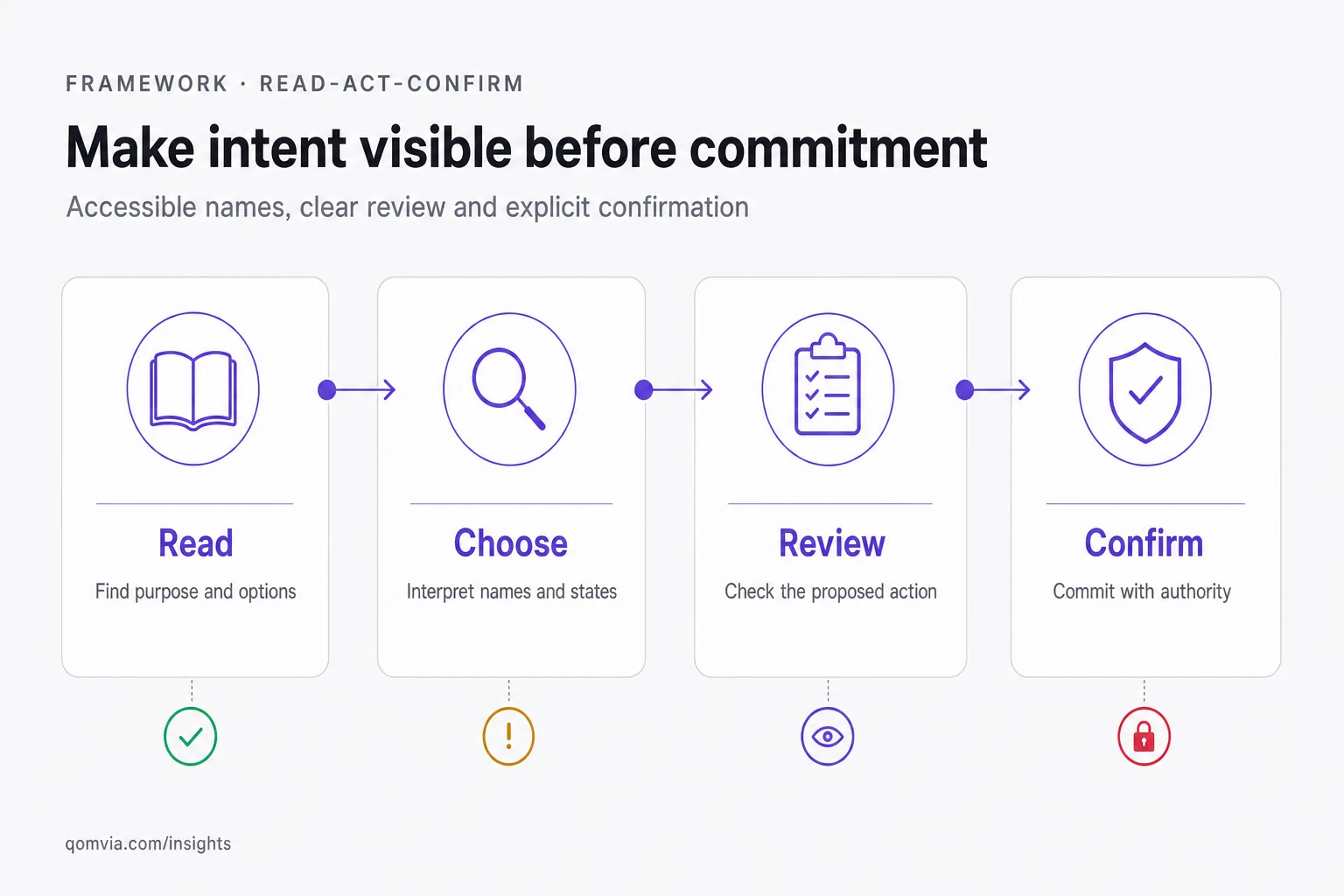
Use a read-act-confirm review. First, ask a tester to find the relevant page and explain what it offers. Next, verify that the intended controls are named, labeled and operable. Then inspect the review step before any consequential action. Finally, test error recovery, cancellation and the state displayed after completion.
Test with keyboard navigation and assistive technology as well as an automated browser experience. Check that focus is visible, labels are announced and errors can be reached. Try a missing required value, an expired session and a declined transaction. Verify that the site does not submit twice or leave the user unsure whether an action succeeded.
Record the task, account state, page version and result. Separate a usability defect from an access-control decision. Ask a security reviewer to examine flows involving payment, personal data and account changes. A successful demo on a public product page does not prove that a protected transaction is safe or accessible.
Include an interrupted journey in the test plan. Navigate away before submission, refresh after a status change, reopen the task in a fresh session and attempt a repeated action. Confirm that the page reports the current state and does not duplicate a purchase or overwrite a newer value. Include both successful and denied actions so the interface explains why a task could not proceed.
Review a representative task with people who use different input and assistive technologies. Ask them to identify the page purpose, select an option, correct an error and explain the final action before confirmation. A technical checklist can reveal missing labels, while an observed task reveals whether the whole interaction makes sense. Record the specific obstacle and repeat the same scenario after changes.
What should a site owner do first?
Make the test repeatable by saving the starting URL, user-visible prerequisites, expected result and control states. If the route depends on authentication, use a safe test account and never include private customer records in a shared demonstration. A documented test lets the site owner confirm whether a repair changed the behavior rather than relying on an anecdote.
Choose a representative task and walk through it using the public page, assistive technology and a normal browser session. Record where the task depends on a visual label, a hidden state or a control that cannot be reached. Fix the path that blocks a person as well as an agent, then rerun the same task.
Set clear confirmation points for actions with meaningful consequences. A site can allow an agent to read public information while requiring the user to review a reservation, payment or message before it is submitted. Explain the action and its consequence in the interface rather than relying on a general statement elsewhere.
Choose one high-value public task and trace it from discovery through completion. Fix ambiguous control names, missing labels, unclear costs and confirmation gaps. Then test a protected task to confirm that authentication and server-side policy still hold. The first improvements should help ordinary visitors even if no browser agent is involved.
Keep the boundary clear: make public information understandable, make actions explicit and keep private data protected. An agent-ready site is not an unrestricted site. It is a site whose important content and controls communicate their meaning while preserving authorization and user choice.
Start with the task that creates the most confusion or consequence, not with an abstract goal to support every agent. Make the public information easy to read, clarify the available choices and identify the point where the user must review or authorize an action. Then test access controls and recovery. The same work improves the experience for customers using assistive technology, keyboard navigation or a conventional browser.
How Qomvia checks readiness for agentic browsers
Qomvia's score tests what an agent sees on your site: rendered HTML, landmarks, bot rules and the files agents look for first.
The free scan runs all 26 checks of the agent-readiness score in about a minute and lists every failing check with a copy-paste fix; the free Site monitor re-scans weekly, no signup for the score. The AI monitor then asks your buyers' questions to ChatGPT, Gemini and Grok every day and shows whether you are named, which rival is named instead and which sources the models used. Qomvia Market and the MCP server take it one step further, letting agents act on the recommendation. Sign up free or see plans and pricing.
Sources and further reading
Questions
- What is an agentic browser?
- It is a browser experience where an assistant can inspect web content and, with permission, use controls to help complete a task.
- How do I make my website easier for browser agents to use?
- Use semantic controls with accurate names, labels and states, keep instructions near the relevant fields and make success and error outcomes clear.
- Should an AI agent be allowed to submit a purchase?
- A consequential action should show the item, terms and impact for review and require appropriate authorization and confirmation.
- How can I protect my website from browser-agent prompt injection?
- Treat page and user-generated content as untrusted data, enforce authorization server-side, restrict sensitive access and confirm consequential actions.
- Does robots.txt protect private website data?
- No. Robots policy expresses intended crawling access but is not a security boundary. Use authentication and server-side access controls for private resources.
- Do ARIA tags help browser agents?
- OpenAI said website owners could add ARIA tags to improve how its browser agent works on their sites. Use accurate accessible names and states, not ARIA as a substitute for semantic HTML.
Score your own site against the rubric this is written from.
Is your site agent-ready?
Free score against the same rubric, in under a minute.
Sign up free to keep the fixes and track the score.
AI monitor
PreviewHow often each model names your site across 11 tracked questions.