Published by Qomvia, , 13 min read
Key takeaways
- Bing's index and webmaster tools matter wherever a Microsoft product explicitly uses Bing Search or Bing grounding.
- IndexNow is a URL change notification, not a guarantee of crawling, indexing or an answer mention.
- Bingbot, OAI-SearchBot and user-triggered fetchers are distinct identities with different operator documentation.
- Do not claim every ChatGPT answer uses Bing. OpenAI's public crawler documentation does not establish that universal dependency.
- Use Bing Webmaster Tools to inspect Bing discovery and IndexNow activity, then measure assistant answers independently.
Why does Bing matter for AI search?
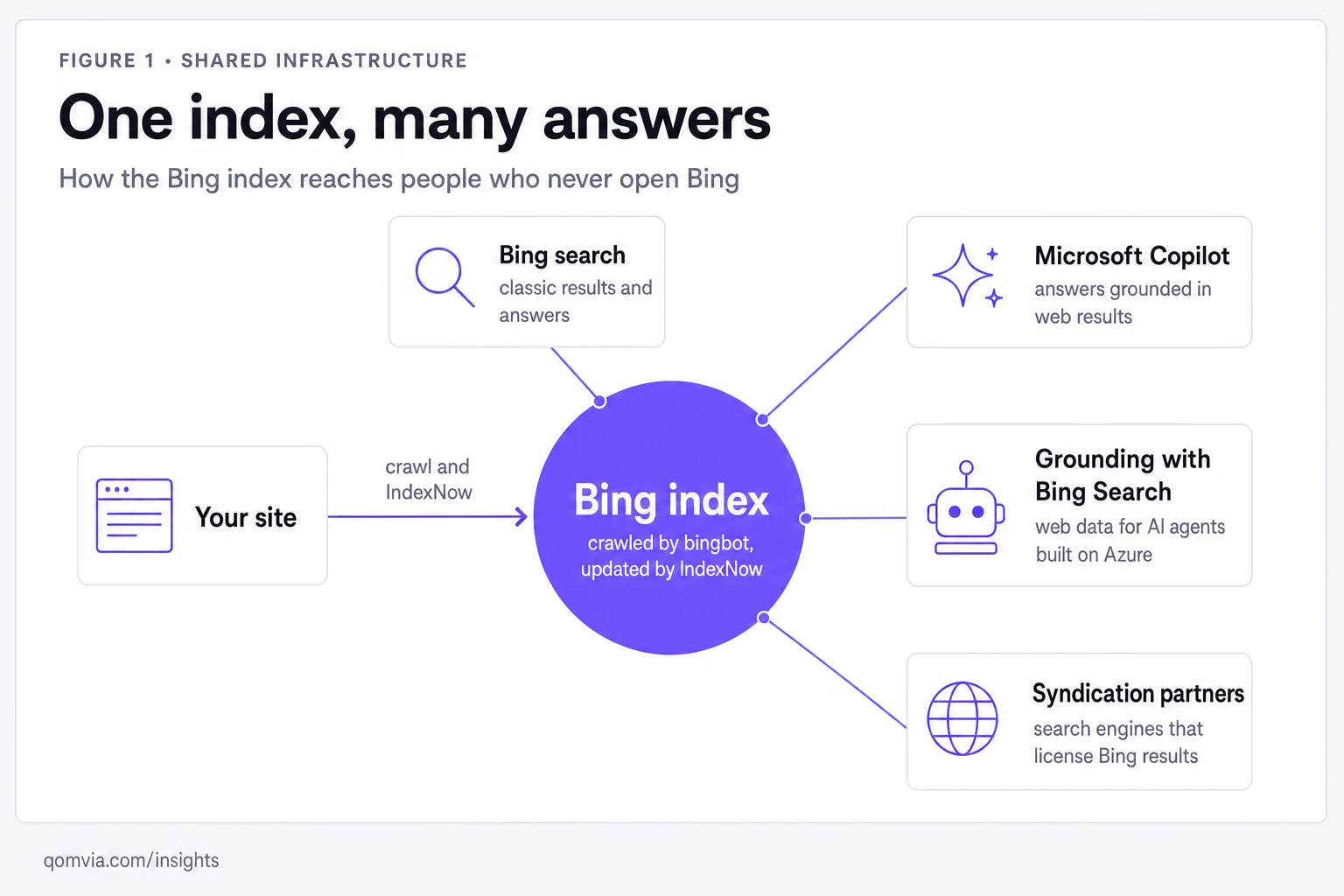
Bing SEO for AI search makes pages discoverable, crawlable and accurately represented in Microsoft's search infrastructure, including systems that explicitly ground answers in Bing Search. Microsoft's Grounding with Bing Search documentation describes a tool that searches the web and cites sources. It does not establish that every AI assistant relies on Bing.
The distinction is strategically important. A website owner can control its own robots rules, canonical URLs, page content, sitemap, IndexNow submissions and Bing Webmaster Tools setup. The owner cannot infer the complete retrieval architecture of a third-party chat answer from one citation. Keep platform claims narrow, cite the operator's documentation and describe uncertainty honestly.
This boundary also keeps product copy credible. Qomvia's AI monitor covers ChatGPT, Gemini and Grok, with Claude and Perplexity as add-ons. It does not measure Bing, Copilot or Google AI Overviews. The measurement framework explains why a brand should not combine answers from products it has not sampled.
How does IndexNow work?
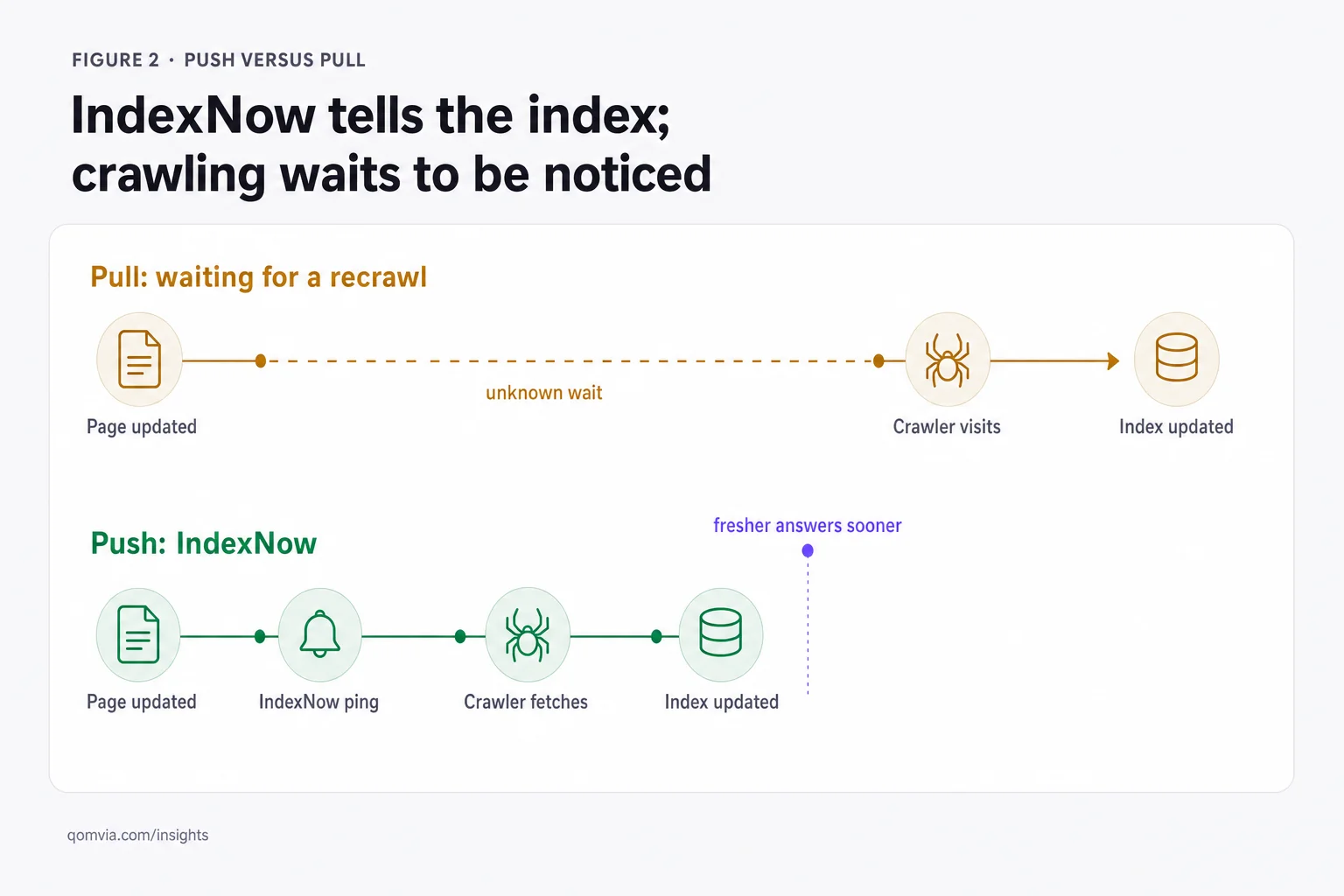
IndexNow is a protocol for notifying participating search engines that URLs have been added, updated or removed. The basic premise is push notification instead of waiting for a search engine to rediscover every change on a future crawl. It can shorten the delay between a site publishing a changed URL and a search engine learning that the URL deserves attention, but a notification is not an indexing command and does not promise that the page will appear in results.
A publisher needs a verified key file, an automated submission step and a clean URL policy. Submit canonical URLs after meaningful changes, not every asset request or routine build. Handle deletions by returning an accurate not-found or gone response and notifying the engine when appropriate. Keep a log of what was submitted and inspect the response and index status separately. Duplicate URLs, tracking parameters and redirect chains can make a technically successful ping less useful.
| Push notification | Pull discovery |
|---|---|
| IndexNow tells participating engines a URL changed | A crawler finds URLs through links, sitemaps or its own schedule |
| Useful for prompt awareness of material updates | Useful for broad discovery and ongoing recrawling |
| Does not guarantee indexing or inclusion | Discovery does not guarantee indexing or inclusion |
| Log the submitted canonical URL and response | Inspect crawl status, canonical selection and index status |
Bing Webmaster Tools documents IndexNow support and provides an IndexNow reporting area. The Qomvia codebase also uses IndexNow for selected newly available pages, but the practical lesson for any publisher is to inspect its own submission log and canonical targets. For Bing's current setup instructions, start with Bing Webmaster Tools IndexNow help, not a third-party list of endpoints.
How do I set up Bing Webmaster Tools?
Verify the canonical host, including whether the site resolves on the preferred www or apex domain. Submit the XML sitemap that lists canonical, indexable URLs. Inspect priority pages and compare the tested URL, declared canonical and selected canonical. When the interface reports a fetch or indexing issue, fix the specific response rather than resubmitting the entire site repeatedly.
Use the URL inspection and crawl reports as diagnostics, not as a promise of traffic. Check redirect loops, blocked resources, error pages, duplicate versions, soft 404s and stale sitemap timestamps. Make sure your robots file does not accidentally block important product or editorial paths. Confirm that your host's firewall and CDN allow genuine Bingbot traffic using Microsoft's verification guidance. A request with a familiar user-agent string is not proof that it came from Bing.
The dashboard is most valuable when paired with a release process. After a material change, update the page, ensure the canonical URL is right, update sitemap metadata, submit to IndexNow when configured, and later inspect whether Bing crawled the intended version. Keep separate notes for content changes and infrastructure changes. That gives the team an audit trail when a page loses visibility or an outdated product fact persists in a result.
Check the crawl path, not only the submitted URL
A sitemap can be fetched while a page is blocked. A URL can return 200 to a browser and 403 to an automated client. A server can redirect a crawler to a localized page with an unrelated canonical. For each important template, test the initial response, headers, robots directives, links and final canonical. See robots.txt for AI crawlers and how to get cited by ChatGPT for the related distinctions among automated and user-triggered agents.
Does ChatGPT use Bing?
The precise answer is that a universal claim is not supported by the public OpenAI bot documentation. OpenAI describes OAI-SearchBot as its search crawler and says it is used to surface websites in ChatGPT search. Microsoft separately documents products that use Grounding with Bing Search. Those statements can both be true without establishing that all ChatGPT answers, all ChatGPT Search queries or every retrieval in every mode depends on Bing.
A careful SEO plan does not need a stronger claim. Being indexed in Bing may improve the chances that Bing-powered products can find a page. It does not prove a page has been retrieved by ChatGPT. Check the cited URL in the answer, inspect Bing Webmaster Tools for Bing's own status, and avoid treating the presence of one source in a response as a map of an entire platform's infrastructure.
Similarly, do not assume Bingbot is the only bot worth allowing. OpenAI publishes OAI-SearchBot, GPTBot and ChatGPT-User for different tasks; Google has Googlebot and other documented crawlers; other systems publish their own agents. A complete policy starts with each operator's first-party explanation. It does not rely on a single Allow: Bingbot line to cover every retrieval path.
What is Grounding with Bing Search?
Microsoft's Grounding with Bing Search is a documented tool for agents that need current public web information. Its stated flow is query formulation, search execution, information synthesis and source attribution. That description is useful to site owners because it makes clear that an answer can depend on both search retrieval and later synthesis. A page has to be discoverable and relevant to the search step before its text can support the final answer.
It is important to separate agent-builder infrastructure from a general consumer product. The Microsoft documentation describes how developers configure a tool in Microsoft Foundry. It does not say that every agent uses the same service, or that a site's Bing rank directly determines its inclusion in every generated response. Use the official Grounding with Bing Search documentation when discussing that integration.
For the practitioner, the durable work remains familiar: publish helpful pages, make them accessible to the crawlers whose use you support, keep canonical URLs stable, maintain internal links and use structured data that reflects visible facts. The protocol and interface landscape changes faster than those fundamentals. The agent readiness pillar maps those fundamentals to the later steps where an assistant extracts evidence and acts.
How do you diagnose Bing crawl friction?
When an important URL is missing from Bing, work from the response outward. Confirm the public URL and its redirects from outside the site. Check that the page returns a usable status to a normal request, then inspect robots rules and any authentication, consent or bot-protection layer. Compare the canonical response with the URL submitted in a sitemap or IndexNow notification. A mismatch between the host, path and canonical target can split evidence across duplicates.
Use a small diagnostic set that includes the home page, one category, one product, one article and one recently changed URL. A template-level error can affect many pages, so sample by template before investigating every URL. Compare the initial HTML with the final browser view. If the bot receives a challenge, record the CDN rule, request timestamp and verification evidence, then ask the provider to confirm the crawler identity before changing a protective policy.
Check whether a page is intentionally excluded. A noindex directive, robots disallow, canonical to a different product or blocked parameter URL can all be correct in some situations. The task is to understand whether the current state matches the site owner's intent. Do not remove every exclusion because a report lists it. An internal search page, expired campaign or duplicate filter URL may not belong in the index.
Separate an indexing issue from a content-selection issue. Bing may crawl a URL and still decide not to include it. If it is indexed but does not appear for the intended query, review whether the page is distinct, useful and well connected to its topic. Search operators or a rank tracker can offer clues, but Bing Webmaster Tools and the public result are stronger evidence for the specific product than an assistant answer from another provider.
Do not respond to every anomaly by submitting the URL again. Repeated pings cannot repair a blocked page, a wrong canonical or a low-value duplicate. Fix the root cause, submit a material change if appropriate and allow time for the crawler to revisit. Keep a short ticket with the before state and final evidence so the team can recognize a recurring template problem.
How should you maintain an index health loop?
A durable process connects publishing to discovery. When an editor publishes or materially updates a page, the content system should set the canonical URL, update sitemap metadata and send supported notifications. The site owner then checks whether the expected page was received and whether it is crawlable. Search Console or Bing Webmaster Tools provide separate diagnostics for each search engine; no one dashboard proves the state of every assistant.
Schedule a periodic review of crawl errors, excluded pages, stale sitemap entries and important URLs that lost index status. Group findings by cause: server errors, blocked paths, duplicate signals, thin or obsolete content, and product-specific constraints. Assign engineering issues to the platform team and editorial issues to page owners. If the same error appears across a template, fix the template and sample several affected URLs after release.
Agree on what counts as a meaningful update before automating submissions. A new paragraph that changes a policy or adds a verified product capability may warrant a fresh discovery signal. A deployment that changes only a build identifier usually does not. The publishing system should avoid submitting every URL on every release, both to conserve operational attention and to keep the change log useful.
Build a change log that pairs a deployment or content edit with the URL notification and later crawl observation. It helps distinguish a normal reprocessing delay from a broken automation. It also protects against accidental over-reporting: a build that touches every file should not imply that every page had a meaningful editorial update. Keep modification dates honest and publish only URLs that changed.
For localized sites, test the intended language and canonical relationship. A submitted English URL should not redirect every automated request to a regional home page or return a page whose language metadata conflicts with its visible text. Keep alternate-language links reciprocal and check that each regional page contains the local product, currency or policy details it claims to represent.
For stores, connect catalog operations to the feed. When a variant is removed, make sure its product URL returns the intended state and that the feed stops advertising it. When the product is updated, confirm the page, feed and product schema show the same current price and availability. A fast discovery signal can make a mismatch visible sooner, but it cannot decide which source of truth the merchant should use.
Finally, preserve the limits of what Bing data can tell you. A successful crawl is not a citation in Microsoft Copilot; an indexed URL is not proof that an assistant retrieved it. To evaluate answer behavior, run a separately defined question set and inspect the sources shown. The AI visibility measurement framework explains how to report that sample without presenting Bing's own index diagnostics as cross-platform monitoring.
Keep a short runbook for incidents. Include who can inspect the CDN, who can verify a search crawler, where sitemap and IndexNow logs live, how to test the public response and who approves a robots change. A crawler issue can expose an access policy that protects sensitive pages, so avoid broad allow rules as a quick fix. Change only the narrow path or request handling that the evidence supports, then test both intended public pages and protected areas.
Review the runbook after a major platform or security change. A new CDN rule, login wall or migration can alter crawler behavior even if the content team has not touched the page. Keep a smoke-test URL for each important template and run it from outside the corporate network. An internal browser session may have cookies, permissions or cached content that a public crawler does not receive.
Use the same canonical URL in internal links, sitemap entries, feeds and notifications. If different systems point at different versions, diagnose that inconsistency before sending more signals. Keep redirected legacy URLs only when they are still needed for users, and ensure their destination is the correct replacement rather than a generic home page.
For each failed inspection, preserve a concise evidence bundle: request time, tested URL, response status, redirect chain, robots result, declared canonical and observed page text. Avoid sending customer data or security secrets in a ticket. This record gives an engineer enough context to reproduce the issue without broadening access or changing several layers at once.
Define success at each point in the loop. A valid notification means the submission was accepted; it does not show that a page was fetched. A crawl record means the bot requested a URL; it does not show that the engine selected it. An indexed result means the page appears in a search context; it does not show what another product will retrieve. Keep these states separate in the runbook and in any dashboard used to brief leadership.
When a page has been crawled but does not appear, review its purpose and distinctiveness. A duplicate product filter, near-identical location page or outdated announcement may not deserve a separate search result. Consolidate pages only when the replacement genuinely covers the user's need, and preserve redirects where a prior URL has external links or user bookmarks. Deleting content to satisfy an index report can break a valid path.
For a template repair, select a few representative URLs before deployment and a different small sample afterward. Confirm the fix works on the main host, a localized variant and a page with the relevant edge case. Document exceptions that are intentionally blocked, such as private account content. A review that includes both the public and protected path is safer than an allow rule applied across an entire host.
Sources and further reading
Questions
- How do I get my website into Microsoft Copilot answers?
- Keep important pages crawlable and useful, maintain Bing discovery signals and inspect Bing Webmaster Tools. Inclusion still depends on the specific Copilot experience and its retrieval process, so no submission can guarantee an answer mention.
- Does ChatGPT use Bing for search?
- OpenAI documents OAI-SearchBot for ChatGPT search, while Microsoft documents its own Bing grounding products. Those sources do not justify a claim that every ChatGPT answer universally uses Bing.
- Does IndexNow guarantee that Bing indexes my page?
- No. IndexNow notifies participating search engines that a URL changed. The search engine decides whether and when to crawl, index and show that page.
- How do I verify Bingbot is crawling my website?
- Use Bing Webmaster Tools crawl diagnostics and Microsoft's guidance for verifying crawler traffic. Do not trust a user-agent string alone because it can be copied by another client.
- Is Bingbot the same as OAI-SearchBot?
- No. They are separate user agents documented by different operators for different products. Allowing one does not imply that another can fetch your site.
- Will IndexNow improve AI search visibility?
- It can notify participating engines about a URL change, which may help them learn about the update sooner. It does not guarantee indexing, ranking, retrieval or citation by an AI system.
Score your own site against the rubric this is written from.
Is your site agent-ready?
Free score against the same rubric, in under a minute.
Sign up free to keep the fixes and track the score.
AI monitor
PreviewHow often each model names your site across 11 tracked questions.