Published by Qomvia, , 13 min read
Key takeaways
- Use these 40 checks to find avoidable barriers, not to predict a guaranteed answer-engine ranking.
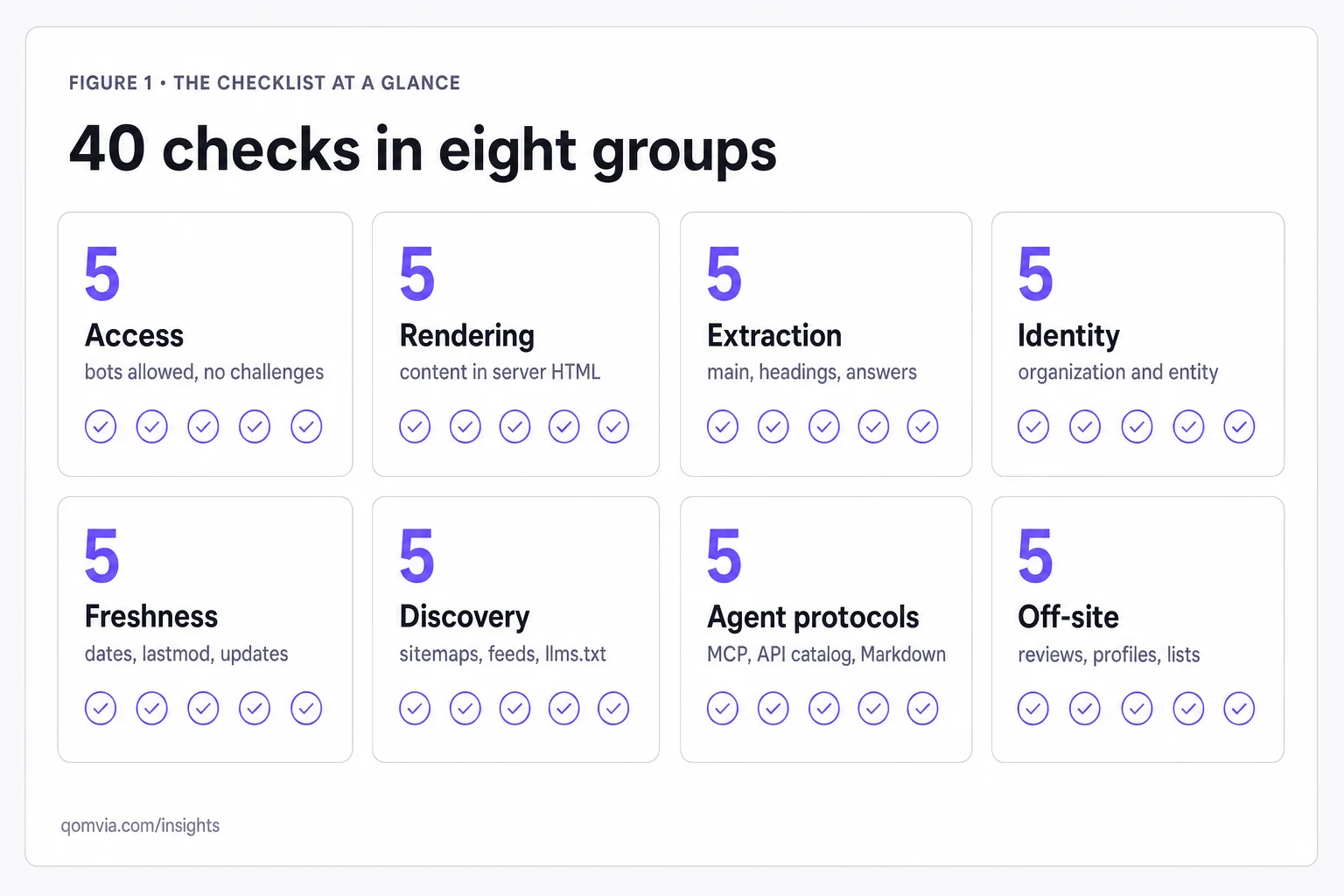
- The eight groups are Access, Rendering, Extraction, Identity, Freshness, Discovery, Agent protocols and Off-site evidence.
- Verify a live response and the rendered page; a source-code screenshot alone can miss edge or JavaScript failures.
- Separate crawler access from training, search and user-triggered fetch policies for each provider.
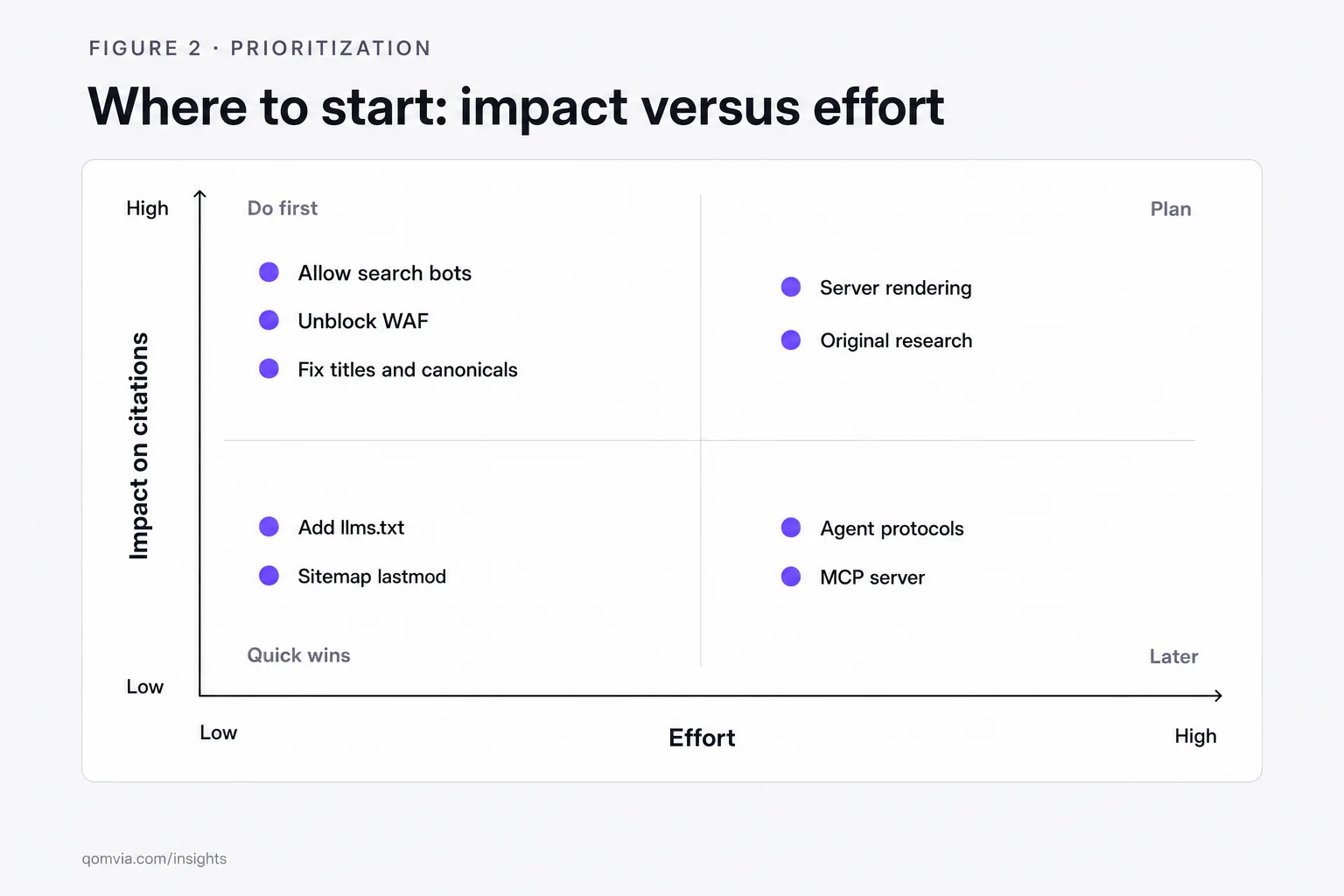
- Prioritize failed checks by affected pages, business importance, fix cost and evidence that the issue actually exists.
What is an AI search optimization checklist?
An AI search optimization checklist is a repeatable review of whether a website can be discovered, fetched, rendered, understood, attributed, kept current and used by AI search or agent systems. This checklist groups 40 observable checks into eight areas. A pass reduces one known barrier; it does not promise that a model will mention, cite or recommend the site.
Use the eight-gate audit to structure a practical review. Each check pairs a reason with a way to verify it. Start with a few priority URL templates rather than scanning every page manually. Record the evidence, affected URLs, owner and next action. Google's own AI-feature guidance recommends familiar fundamentals such as crawl access, internal links, text availability and structured data that matches visible content. Other providers publish their own crawler documentation, so do not assume one platform's settings apply everywhere.
A check only matters if it can change a decision. Mark a condition as verified, failed, not applicable or unknown. “Unknown” is not a pass. Prioritize by scope and consequence: a robots rule blocking every product page is more urgent than a missing machine-readable description on one low-value URL. Use the agent readiness pillar for the full explanation of how the stages relate.
Access: can the relevant crawler fetch the page?
Access checks begin with an ordinary HTTP request and then separate operator-specific agents. OpenAI documents OAI-SearchBot for surfacing websites in ChatGPT search, GPTBot for content that may be used in training and ChatGPT-User for certain user actions. Google, Microsoft and other providers define their own crawlers. A broad rule like “allow AI” obscures which client is allowed and why.
- 1. Access: Fetch the canonical URL and verify a successful status, expected content type and final destination.
- 2. Access: Review robots.txt for rules affecting search crawlers you intend to support; test the actual path, not only the homepage.
- 3. Access: Inspect CDN, WAF and bot-management logs for challenges or denials to documented crawlers.
- 4. Access: Confirm important pages do not require login, cookies or a human-only interstitial to expose their main information.
- 5. Access: Record separate policies for search, training and user-triggered fetchers; validate user-agent rules against each operator's current documentation.
The important distinction is between the policy you configured and the response the bot receives. A robots allow rule does not override a firewall challenge. A 200 response can still be a consent wall, empty app shell or error template. Review the full response body and headers. If a provider publishes an IP verification method, use it before attributing suspicious log traffic to that provider.
Rendering: does the fetched page contain its useful content?
A browser view can hide how much work a crawler must do. Compare the initial HTML response with the rendered DOM. If product names, answer text, pricing or policy details appear only after a client-side request, test whether the relevant crawler can execute the script and receive the same data. Do not assume every system renders the page exactly as Chrome does.
- 6. Rendering: Compare server HTML with the browser-rendered page for the main content and primary answer.
- 7. Rendering: Verify critical text is selectable and not present only inside an image, canvas or inaccessible widget.
- 8. Rendering: Check that overlays, cookie banners and interstitials do not replace or obscure the main content.
- 9. Rendering: Inspect canonical, title and robots metadata after rendering and confirm client scripts do not overwrite them incorrectly.
- 10. Rendering: Test a representative page on mobile and a low-bandwidth connection for missing or delayed content.
Rendering problems often come from shared templates, not an individual article. Check a representative product page, category page, help page and article. Ensure the most important content arrives early and remains available without an unusual interaction. If the design relies on tabs or accordions, provide understandable labels and make the content discoverable to both people and fetchers.
Extraction: can a system identify the answer?
Extraction is easier when a page has a clear subject, meaningful hierarchy and complete statements. Google's AI-feature guidance recommends making important content available in text, improving internal links and matching structured data to visible text. That is not a formula for selection; it is a practical test for whether a page says what its owner intends.
- 11. Extraction: Give the page one descriptive title and a clear primary heading that matches its subject.
- 12. Extraction: Use section headings that describe the question or topic answered below them.
- 13. Extraction: Put key definitions, limits and answer conditions in text rather than relying on context hidden in a graphic.
- 14. Extraction: Use lists or tables when the relationship among steps, features or options is easier to scan that way.
- 15. Extraction: Validate structured data against visible content and remove properties that are stale or unsupported.
An extractor can preserve a sentence and lose its condition if the page buries the caveat elsewhere. Keep qualifications close to the claim. Put units, time period and geography beside a number. Label illustrative examples. If the page compares products, state whether facts come from a current source, and keep your own opinion distinguishable from published product details.
Identity: is the entity behind the page unambiguous?
A company can publish excellent information and still be difficult to disambiguate. Company names change, products share labels, subsidiaries publish on different domains and third-party profiles may refer to an outdated brand. Identity work aligns what the site says about the organization with official profiles, product pages and credible public references.
- 16. Identity: State the organization's public name, official domain and purpose on a discoverable About page.
- 17. Identity: Use Organization or relevant entity structured data that reflects the visible business facts.
- 18. Identity: Check that official profile links and
sameAsreferences point to pages controlled by or genuinely identifying the organization. - 19. Identity: Distinguish parent company, product, local business and brand names where they are not interchangeable.
- 20. Identity: Audit major directories and partner profiles for stale names, URLs, addresses or product descriptions.
Google says Organization structured data on a homepage can help it better understand administrative details and disambiguate an organization in Search. Treat that as a Google-documented use, not a promise about every AI system. The organization JSON-LD guide explains how to connect identity signals without suggesting that markup can manufacture reputation.
Freshness: are important facts current and internally consistent?
Freshness is not a date stamp alone. The useful question is whether a fact that can change has an owner, source of truth and review cadence. Prices, availability, product features, staff roles, policy language and legal requirements age differently. A page updated today with an old claim is still stale; a stable definition may remain accurate for years without a new date.
- 21. Freshness: Identify time-sensitive claims and name an owner responsible for reviewing them.
- 22. Freshness: Align published dates and
lastmodmetadata with substantive updates, not routine deployments. - 23. Freshness: Check prices, availability and product capabilities against the authoritative system or current official source.
- 24. Freshness: Remove or clearly archive expired promotions, discontinued products and superseded instructions.
- 25. Freshness: Record citations and review dates for external claims that can change.
Do not silently rewrite history in a way that makes a dated article appear to have known future facts. When a page is updated, preserve its publication context and explain material changes when appropriate. For commerce, automate synchronization from the catalog system where possible. For regulatory or technical guidance, schedule review with a subject matter expert rather than relying on a generic annual reminder.
Discovery: can an important URL be found and revisited?
Discovery checks cover the routes by which a crawler finds and prioritizes pages. Internal links expose relationships and reduce orphan content. Sitemaps list URLs, while feeds and APIs can describe changing inventories. Canonical links and redirects help consolidate variants. IndexNow can notify participating search engines about changed URLs, but does not guarantee crawling or indexing.
- 26. Discovery: Link important pages from relevant categories, navigation or related content instead of leaving them orphaned.
- 27. Discovery: Keep XML sitemaps limited to canonical, indexable URLs and update meaningful modification dates.
- 28. Discovery: Verify that redirects and canonical tags consolidate duplicate URL variants to the intended page.
- 29. Discovery: Publish a machine-readable feed or API where the business has a frequently changing catalog or dataset.
- 30. Discovery: If using IndexNow, submit changed canonical URLs and inspect receipt separately from index status.
Validate a new page from more than one entry point: follow internal links, inspect the sitemap and check canonical resolution. For changed pages, compare the old and new content and notify supported systems when appropriate. Do not create a huge sitemap of URLs that redirect, return errors or cannot be indexed. See Bing SEO for AI search for the distinction between notification and inclusion.
| Discovery signal | Verify | Common failure |
|---|---|---|
| Internal link | Follow it from a relevant page | Orphan page or vague anchor |
| Sitemap | Fetch and sample canonical URLs | Redirects, noindex or stale URLs |
| Canonical | Compare declared URL with final response | Conflicting host or parameter variant |
| Feed or API | Check schema, updates and stable IDs | Stale facts or undocumented endpoint |
| IndexNow | Inspect submitted URLs and response | Treating receipt as guaranteed indexing |
Agent protocols: can a machine find a safe interface?
Protocol checks matter when a site intentionally exposes structured actions or machine interfaces. They are not prerequisites for a text page to appear in ordinary search. A machine-readable file should describe a real endpoint and its behavior. A declaration that points to a nonfunctional API increases ambiguity rather than readiness.
- 31. Agent protocols: Fetch each published discovery file and confirm its endpoint, ownership and documentation are current.
- 32. Agent protocols: Verify API schemas accurately describe required fields, authentication and error responses.
- 33. Agent protocols: Test an example request and ensure secrets or privileged credentials are never exposed publicly.
- 34. Agent protocols: Document which actions require user consent, account authentication or final confirmation.
- 35. Agent protocols: Exercise expired offers, duplicate requests, failed payment and cancellation before enabling transactions.
A seller may publish a product feed but have no agent checkout. A site may publish an MCP card while its tool is unavailable. Record actual coverage and stage rather than treating every protocol file as live commerce. The agentic commerce guide outlines how product data, consent and merchant fulfillment connect.
Off-site evidence: do public sources corroborate the site?
Off-site checks review the evidence beyond the domain: customer feedback, partner pages, trade coverage, public product documentation and profiles that can corroborate what the site claims. The objective is not to manipulate a model with a volume of mentions. It is to make the real organization and its work easier for people to verify across credible contexts.
- 36. Off-site: Audit official partner and directory listings for current names, URLs, services and locations.
- 37. Off-site: Request honest customer feedback through permitted channels without drafting or buying reviews.
- 38. Off-site: Publish case studies with customer permission, clear context and evidence for measurable outcomes.
- 39. Off-site: Review source links in answers or search results and correct demonstrably false facts through legitimate channels.
- 40. Off-site: Maintain an evidence log that separates earned coverage from first-party claims and paid placement.
A website owner cannot control every third-party page, and a citation is not an endorsement. Avoid fake review schemes, fabricated profiles and edits that violate community rules. When a source is wrong, preserve the URL and exact error, contact the publisher with primary evidence and revisit the page after an update. The competitor recommendation diagnosis explains how to investigate answer-level sources without overreading them.
How do you turn the 40 checks into a work plan?
Score each check as pass, fail, unknown or not applicable, then attach evidence such as a URL, response, screenshot or source quote. A failing condition without evidence can still be a useful hypothesis, but label it for verification. Group failures by template or root cause. Fixing one shared rendering issue may clear dozens of URLs; rewriting one paragraph may help a single page.
Prioritize with four questions: how many important pages are affected, what user or business task fails, how strong is the evidence, and how costly is the fix? Assign one owner and a retest date. Re-run only the checks affected by the change, then sample answer behavior separately. A passing technical check does not prove a brand is cited, and a citation does not prove a transaction path is safe.
Use a risk label alongside the pass or fail state. A critical issue blocks a high-value page or could expose customers to a wrong transaction. A major issue affects a whole template or hides essential product information. A minor issue is isolated and has a viable workaround. These labels help teams order work, but they are not a universal severity standard. Define them in the audit brief and apply them consistently.
Retest with the same evidence type where possible. If the original failure was an HTTP challenge, verify the crawler response after the firewall change. If it was a missing passage in initial HTML, compare the response body and rendered DOM. If a third-party listing was stale, inspect the publisher's live page after correction. A change in an answer sample can be useful, but it may not isolate which implementation change mattered.
Set a repair threshold before expanding the audit
Agree on a threshold for moving from a pilot to a broader review. A critical template failure can justify immediate rollout to all affected pages. A low-severity issue on one rarely used route may stay in the normal backlog. Use the same severity definitions across teams so a product data discrepancy is not treated as a minor copy issue simply because it appears outside the website.
Close each finding with evidence, not an assumption. A ticket marked “fixed” should link to the new response, page version, data record or corrected publisher listing. If the evidence cannot be obtained, mark the result as unknown and keep the owner assigned. This discipline prevents old audit notes from becoming a false record of site readiness.
Keep a record of unresolved unknowns. Some interfaces do not expose their crawler or retrieval settings, and some third-party profiles cannot be edited directly. Do not turn those unknowns into assumed passes. Assign a follow-up question to a source owner, note what evidence would resolve it and continue with the parts of the site the business can control.
For answer visibility, define a stable question set, model, mode, market and sampling window. Qomvia's AI monitor tracks ChatGPT, Gemini and Grok, with Claude and Perplexity add-ons; it does not measure Copilot, Bing answers or Google AI Overviews. The AI search measurement framework explains how to report that scope without conflating technical readiness with observed answers.
Sources and further reading
Questions
- How do I optimize my website for ChatGPT, Perplexity and Gemini?
- Start with accessible, useful pages, clear identity and up-to-date facts, then check each provider's crawler documentation and test answers separately. No generic checklist guarantees that a platform will cite a website.
- What are the most important AI SEO checks?
- Prioritize crawl access, useful content in the fetched page, clear page structure, consistent organization and product facts, and discoverable canonical URLs. Add protocol checks only when your business exposes a machine interface or action.
- Does IndexNow guarantee that AI systems index my site?
- No. IndexNow notifies participating search engines about URL changes. It does not guarantee a crawl, index entry, ranking, answer retrieval or citation.
- Should I block GPTBot but allow OAI-SearchBot?
- Those are separate OpenAI user agents with different documented roles, so the policy depends on your preferences. Review OpenAI's current bot documentation and test the resulting access rules.
- Do I need llms.txt to appear in AI search?
- A machine-readable site guide may help explain a site's contents to some readers or systems, but it is not a universal requirement or confirmed ranking signal. Focus first on crawlable pages, useful content and clear navigation.
- Will passing all 40 checks make my brand appear in AI answers?
- No. The checks identify observable technical and evidence conditions, not a ranking formula. Track actual answers with a defined question set and keep the measurement conditions alongside any reported results.
Score your own site against the rubric this is written from.
Is your site agent-ready?
Free score against the same rubric, in under a minute.
Sign up free to keep the fixes and track the score.
AI monitor
PreviewHow often each model names your site across 11 tracked questions.